
Business Automation for SMBs: What to Automate First


- Business Automation
- The use of software and technology to complete repetitive business tasks with minimal manual effort.
- SMBs (Small and Medium-Sized Businesses)
- Businesses with relatively limited employees, revenue, or operational resources compared with large enterprises.
- Business Process Automation (BPA)
- Using technology to automate multi-step business processes, such as invoicing, customer onboarding, and order processing.
- Workflow Automation
- Automatically completing a sequence of tasks based on predefined triggers, conditions, and actions.
- CRM Automation
- Automating customer relationship management activities, including lead tracking, follow-ups, and customer data updates.
Running a small or medium-sized business often means managing customer inquiries, invoices, appointments, sales records, and internal tasks with limited staff. As these responsibilities increase, repetitive administrative work can consume time that could otherwise support customers and business growth.
Business automation for SMBs helps reduce that workload by allowing software to complete routine tasks, transfer information between systems, and notify employees when action is needed.
However, successful automation does not require replacing every manual process. The most practical starting point is identifying frequent, predictable tasks that can be automated safely and measured for results.
What Is Business Automation for SMBs?
Business automation for small and medium-sized businesses involves using software to perform repetitive activities with minimal manual intervention. A workflow might automatically create a customer record after someone submits a website form, send an appointment reminder, or update inventory information after a sale.
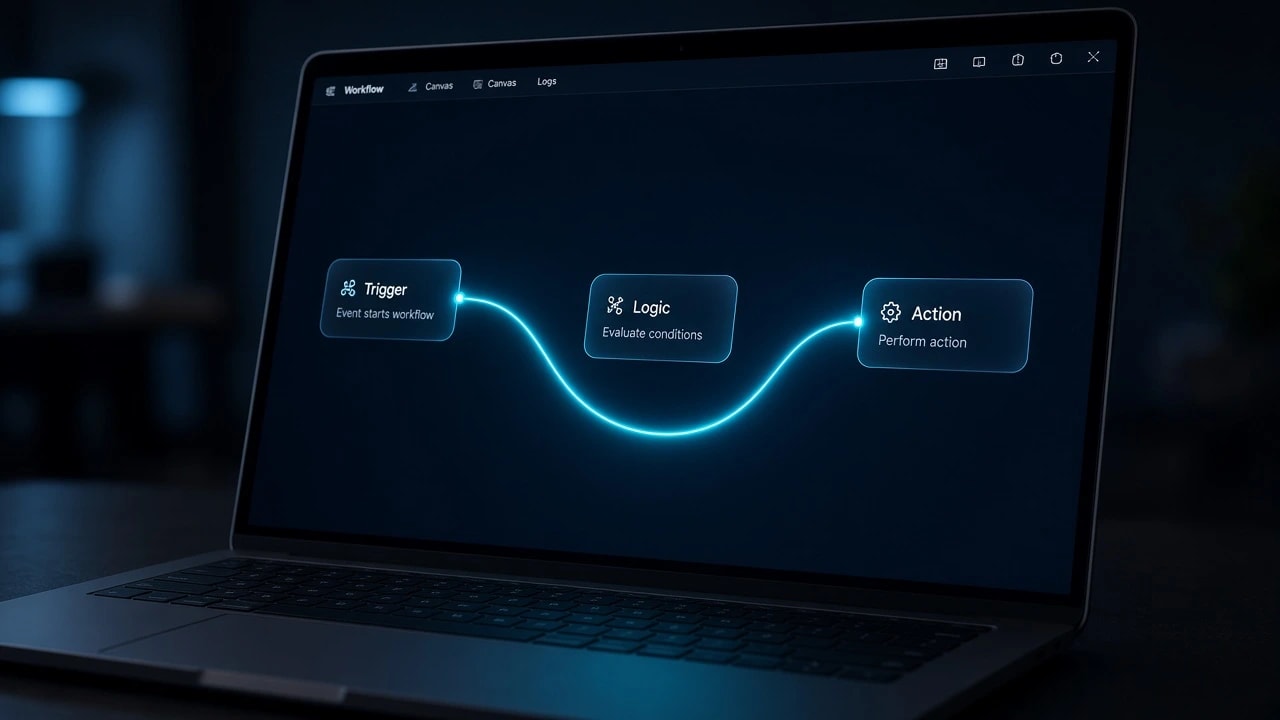
These systems typically use triggers, conditions, and actions. For example, a new inquiry triggers a workflow that checks the requested service, records the customer's information in a CRM, and assigns the lead to an available employee.
Automation does not necessarily require artificial intelligence. Traditional workflow automation follows predetermined rules, while AI-powered systems can assist with less structured tasks such as categorizing messages or summarizing documents.
Businesses considering more advanced applications can explore how AI is changing business automation, including the differences between rule-based workflows and AI-assisted operations.
Why Small Businesses Should Start Automating Repetitive Tasks
Small businesses often rely on employees who handle several responsibilities simultaneously. An administrator might respond to customers, update spreadsheets, prepare invoices, and coordinate schedules throughout the day. While these tasks are necessary, many follow repeatable patterns that software can manage.
Automating routine activities can improve consistency and reduce delays between business processes. For instance, a customer inquiry received outside office hours can be recorded immediately, even when an employee is unavailable to respond personally.
The benefits depend on the quality of the underlying process. Automating inaccurate information or unclear instructions can introduce additional problems instead of solving them.
A useful principle is to simplify the workflow before automating it. The National Institute of Standards and Technology emphasizes this approach in its Automation 101 implementation guide, which recommends assessing operations and eliminating inefficiencies before introducing automation.
How Business Automation Improves Daily Operations
The operational value of automation extends beyond reducing the time spent completing individual tasks. It can also improve the reliability of handoffs between employees, departments, and software platforms.
Consider a service business where website inquiries are manually copied into a spreadsheet before being forwarded to a sales representative. Delays or missing information can prevent timely responses. An automated workflow can transfer the information directly to a CRM, assign an owner, and create a notification.
Automated systems can also maintain activity records, helping managers identify incomplete tasks and recurring bottlenecks. However, employees still need to monitor failures, verify important information, and handle situations requiring judgment.
For SMBs, the strongest early improvements usually come from making everyday processes more dependable rather than introducing complicated technology across the entire organization.
What Should SMBs Automate First?
The best first automation is generally a task that happens frequently, follows consistent rules, and causes limited damage if an error occurs. Processes involving repetitive data entry, reminders, and information transfers are often better starting points than complex financial or customer-service decisions.
Before selecting a workflow, business owners should review how employees spend their time and identify processes that repeatedly interrupt more valuable work.
Common starting points include:
Lead capture and follow-up: Automatically transfer website inquiries into a CRM, assign sales representatives, and acknowledge submissions.
Appointment scheduling: Allow customers to select available times and receive booking confirmations and reminders.
Invoice reminders: Notify customers about upcoming or overdue payments based on approved billing rules.
Customer data entry: Synchronize information between forms, spreadsheets, CRMs, and other business applications.
Task assignments: Create employee tasks automatically when a new order, customer request, or project reaches a defined stage.
Routine reporting: Combine information from connected systems into scheduled operational reports.
Customer support routing: Categorize incoming inquiries and send them to the appropriate department.
A small business does not need to implement every workflow simultaneously. Selecting one measurable process allows employees to evaluate performance, identify problems, and develop a reliable foundation for additional automation.
How to Identify High-Value Automation Opportunities
Not every repetitive activity deserves automation. Some tasks occur too infrequently to justify implementation costs, while others involve exceptions that require substantial human judgment.
The goal is to identify processes where automation delivers meaningful benefits without introducing unnecessary complexity.
Business owners can begin by observing existing workflows and documenting the activities employees complete during a normal week. This provides a clearer picture of where delays, duplicated work, and recurring mistakes occur.
A practical evaluation should consider the following factors:
Frequency: How often does the task occur each week or month?
Time requirement: How much employee time does each occurrence consume?
Consistency: Does the task follow clear, repeatable steps?
Error risk: What happens if the automated process makes a mistake?
Data availability: Is the required information already available in digital form?
Integration requirements: Can the existing applications exchange the necessary information?
Measurability: Can the business compare performance before and after implementation?
Processes scoring well on these factors are generally stronger candidates for an initial automation project.
Prioritizing Automation by Business Impact
A useful way to prioritize automation opportunities is to compare their expected operational value against implementation effort and risk.
For example, automatically creating CRM records from online inquiries may be relatively straightforward because the information already exists in a digital form. By comparison, automating complex customer disputes may require detailed judgment, access to sensitive information, and multiple approval procedures.
Businesses can rank potential workflows using a simple scoring system. Assign each process a score from one to five for frequency, time consumption, standardization, and implementation ease. Separately assess the consequences of errors and the sensitivity of the information involved.
High-scoring processes with manageable risks should receive priority.
Examples of promising early opportunities include:
Website form submissions that employees currently enter into a CRM manually.
Appointment reminders that staff send individually every day.
Repeated status updates between project-management applications.
Routine internal notifications when orders or service requests are received.
Scheduled data exports that employees repeatedly compile into reports.
The evaluation should also consider whether an existing software subscription already includes the necessary automation features. Using a built-in capability can be simpler than introducing another application.
Business Processes That Should Keep Human Oversight
Automation becomes more complicated when business decisions involve legal obligations, financial consequences, sensitive information, or customer relationships.
For example, software can collect invoice details and flag inconsistencies, but authorizing an unusual payment may require approval from a responsible employee. Similarly, AI may draft a response to a customer complaint, but an employee should review messages involving refunds, disputes, or potentially harmful errors.
Human oversight is particularly important when employees cannot easily reverse an automated action.
Processes that often require additional safeguards include:
Approving significant payments, refunds, or financial transactions.
Making hiring, disciplinary, or employment decisions.
Handling legal disputes and regulatory compliance matters.
Processing sensitive medical, financial, or personal information.
Sending contractual commitments or unusual customer promises.
Deleting records or making irreversible changes to business systems.
Resolving complaints involving safety, discrimination, or complex circumstances.
Automating supporting activities, such as collecting documents or requesting approvals, can still be valuable. The important distinction is between automating administrative steps and delegating consequential decisions without adequate controls.
Best Business Automation Tools for Small and Medium-Sized Businesses
SMBs can automate workflows using software they already own, dedicated automation platforms, or custom-built integrations. The appropriate choice depends on the number of applications involved, the complexity of the process, and the technical resources available.
Built-in automation features are often the most practical starting point. CRM platforms may support lead assignment and email notifications, accounting systems may provide recurring billing and payment reminders, and scheduling tools may automatically confirm appointments.
When a workflow needs to connect separate applications, platforms such as Zapier, Make, and Microsoft Power Automate can help transfer information and trigger actions across supported services.
More complicated requirements may involve application programming interfaces (APIs), webhooks, or custom software. These approaches become useful when standard integrations cannot handle specific business rules, data formats, or approval procedures.
For businesses evaluating connected systems, CodeNVibe's business automation and workflow integration services provide examples of CRM synchronization, lead routing, reporting automation, and cross-platform workflows.
Before choosing any platform, businesses should review subscription limits, integration compatibility, access controls, error notifications, and the amount of ongoing maintenance required.
Common Business Automation Mistakes to Avoid
Introducing automation without understanding the underlying workflow can create technical and operational problems. A process that appears simple may depend on undocumented employee decisions, inconsistent data, or manual exceptions.
Businesses should investigate these dependencies before relying on automated systems.
Common automation mistakes include:
Automating inefficient processes: Software may execute unnecessary steps faster without improving the overall workflow.
Implementing too many workflows simultaneously: Multiple projects can make testing, troubleshooting, and employee training difficult.
Using inaccurate customer data: Duplicate or outdated records can spread mistakes across connected systems.
Ignoring exceptions: Workflows may fail when an unexpected input or unusual customer request appears.
Removing human oversight too early: High-impact decisions can create financial, legal, or reputational risks when handled without appropriate review.
Overlooking security: Integrations may expose customer information when permissions, credentials, or vendors are not managed properly.
Failing to monitor performance: An automation can stop working after an API update, expired credential, or software change.
Choosing tools without considering maintenance: A complicated collection of integrations can become expensive or difficult to manage over time.
Security should be considered from the beginning. The FTC's cybersecurity guidance for small businesses recommends safeguards including software updates, data backups, employee training, and appropriate protection of business systems.
Automation platforms should follow the same principles. Businesses should restrict access to necessary data, secure integration credentials, monitor activity, and maintain a procedure for handling failures.
How to Implement Business Automation Step by Step
A successful automation project begins with a clearly defined business problem, not a particular software product. Before selecting tools, the business should understand what the current process does, who owns it, and how success will be measured.
For example, consider a company that receives customer inquiries through its website. Employees currently review the submissions, copy the details into a spreadsheet, create CRM records, and assign inquiries to sales representatives.
A straightforward automation could capture the form submission, validate required fields, create the CRM record, assign an owner, and send an internal notification.
Create a Simple Automation Implementation Plan
An implementation plan should describe the existing workflow, the desired result, and the responsibilities of everyone involved.
Start with one process rather than attempting a complete operational transformation. Document its normal steps and exceptional cases, then determine whether the proposed automation can reliably handle them.
A practical implementation sequence is:
Step 1 — Document the workflow: Record its trigger, inputs, decisions, actions, and final output.
Step 2 — Establish baseline metrics: Measure current processing time, volume, error frequency, and employee involvement.
Step 3 — Select appropriate software: Confirm that the necessary applications and integration methods are supported.
Step 4 — Design the automation: Define triggers, conditions, actions, approvals, and failure notifications.
Step 5 — Test with sample data: Check normal submissions, incomplete records, duplicate entries, and unexpected inputs.
Step 6 — Run a limited pilot: Introduce the workflow to a small group while maintaining a manual fallback.
Step 7 — Monitor results: Compare performance against the baseline and correct recurring issues.
Step 8 — Document and expand: Record ownership, troubleshooting instructions, and maintenance requirements before automating additional processes.
For workflows that connect websites with operational systems, the underlying website architecture can also matter. CodeNVibe's article on custom websites versus WordPress and Shopify explains when standard website platforms become difficult to extend with business-specific integrations.
How to Measure Business Automation ROI
Automation return on investment (ROI) compares the value created by a workflow with the costs required to implement and maintain it.
The first step is calculating the time employees currently spend completing a particular task. Businesses can then measure how much of that time remains after automation, including time spent reviewing exceptions and correcting errors.
For example, suppose an employee processes 100 inquiries each week, spending five minutes entering and assigning each one. That represents approximately 8.3 hours of weekly work.
If automation reduces the average manual effort to one minute per inquiry, the business saves approximately 6.7 hours each week, before accounting for maintenance and unusual cases.
At an illustrative loaded labor cost of $25 per hour, this equals approximately $167 in weekly capacity value.
Useful ROI measurements include:
Hours saved: Employee time eliminated from repetitive activities.
Labor capacity value: Hours saved multiplied by the relevant hourly labor cost.
Error reduction: Changes in duplicate records, incorrect entries, and failed transfers.
Processing speed: Time required to complete a workflow before and after automation.
Customer response time: Time between receiving an inquiry and taking the first meaningful action.
Implementation costs: Software setup, development, integration, testing, and training expenses.
Ongoing costs: Subscription fees, maintenance, monitoring, and exception handling.
Business outcomes: Changes in completed appointments, successful payments, or other relevant results.
A basic ROI calculation is:
ROI (%) = [(Total measurable benefits − Total automation costs) ÷ Total automation costs] × 100
This calculation should use a consistent measurement period. Time saved should not automatically be counted as direct cash savings unless it actually reduces spending. In many SMBs, the benefit is additional employee capacity rather than lower payroll.
The Long-Term Benefits of Business Automation for SMBs
Business automation becomes more valuable when individual workflows operate as part of a connected, well-maintained system. Instead of repeatedly transferring customer information between applications, businesses can maintain consistent records and reduce unnecessary administrative handoffs.
This can make it easier to manage increasing transaction volumes, monitor everyday operations, and maintain service quality as a business grows. Employees may also have more time for customer relationships, problem-solving, and other activities that require human judgment.
However, automation does not remove the need for process ownership. Workflows must be reviewed when business rules change, employees leave, integrations are updated, or new security requirements arise.
For small and medium-sized businesses, the most sustainable approach is to automate one dependable process, verify its results, and gradually expand. The objective is not to automate everything, but to create an operating environment where employees and software handle the work each performs best.
Frequently Asked Questions
Need help building this?
Our team specializes in custom software solutions. Let us handle the technical complexity.
Get a Free ConsultationAbout the Author

Engineering & Growth Team at CodenVibe
The CodenVibe team builds custom automation, API systems, and scalable web platforms for growing businesses. We share what we learn from the trenches of real client projects.